
7 Ways to Use Google Ads
How Google Ads Works
Google Ads relies on a keyword auction system. This requires you to compete with other users to display your ads in strategic positions—either on search engine results pages or on partner sites.
Every time a user types in your targeted keyword, Google selects the most relevant ad to display at the top. Typically, this ad has the highest bid and the highest quality score among competitors.
This process ensures that Google Ads only displays ads to the most potential audience—based on their interests, location, and behavior. This ensures that every click and impression you receive is aligned with your budget.
Furthermore, you only pay if your target audience actually interacts with your ad—such as clicking on it.
Google Ads Advertising Costs
Google Ads advertising costs vary significantly, determined by various factors—such as campaign type, keyword competition, target location, ad quality, and audience segmentation. Pay attention to these factors to save money!
Campaign Type: Search Ads are typically more expensive due to the high level of competition. Unlike display or video ads, which tend to be cheaper per click.
CPC (Cost-Per-Click): The cost per click in Indonesia starts at around IDR 800 for search ads, IDR 150 for display ads, and around IDR 30 per view for video ads.
Daily Budget: For a daily ad budget, you can set aside IDR 10,000 per day. If you want to follow Google’s minimum budget recommendation, prepare a budget of around IDR 60,000 per day.
Bid and Quality Score: With a high bid level and quality score, your ad will appear more frequently and more cost-effectively.
Bid Adjustment and Schedule: Ads that appear during peak hours or in premium locations tend to be more expensive. This is because bid adjustment and schedule settings are also major factors in determining the total advertising cost.
Industry: Sectors with high competition (e.g., technology, insurance) will also incur higher budgets per click.
How to Use Google Ads
To use Google Ads, all you need is a business Gmail account. With this account, you can sign up for Google Ads and start an advertising campaign for your business. Follow these steps to start using Google Ads:
1. Create a Google Ads Account
First, go to ads.google.com, and Google will direct you to the first ad campaign creation page. When creating an account, you’ll see three simple steps: adding your business information, creating an ad, and setting a budget.
Include your business name and the objective of the campaign, whether to visit your website, call your number, or visit the app download page.
2. Integrate Google Ads with Other Google Apps
After that, you’ll be asked to connect other Google apps to your Google Ads account—such as Google My Business, Google Merchant Center, and YouTube. This will provide you with enhanced features that will be very helpful in creating business campaigns.
3. Determine Campaign Objectives
First, determine the main objective of your campaign. On Google, there are several ad objectives, namely:
Online Sales
Leads
Increasing Website Traffic
App Promotion
Awareness and Consideration
Physical Store Visits
In addition to the awareness and physical store visits objectives, there are several additional steps you will go through – depending on the needs of your business campaign.
Online Sales
If you select Online Sales, you will be asked to specify campaign goals and additional sales targets for reporting purposes – for example, customers who make a payment, add an item to their cart, or visit your business website.
After that, determine what phrases or vocabulary customers use when searching for your business’s products or services (maximum 50).
Leads
For this option, you need to select one of the ad targets – such as prospects who make a phone call, visit a page, fill out a form, contact your business, or click on a link to a specific website.
Increasing Website Traffic
In this objective, you must determine what phrases or vocabulary customers use when searching for your business’s products or services (maximum 50). Additionally, you can also reset the location and language used on your website.
App Promotion
As the name suggests, you’ll need to choose which app you want to advertise—either for Android or iOS. Then, log the created app into your Google account.
Awareness, Consideration, and Physical Store Visits
When selecting these two campaign objectives, you will be directed to choose from available ad types—such as Display Ads, Browse Ads, Application Ads, and Video Ads. Google will even recommend ad types that align with your campaign objective.
3. Create Your Campaign and Ad
You will be directed to choose from available ad types—such as Display Ads, Browse Ads, Application Ads, and Video Ads. Google will even recommend ad types that align with your campaign objective.
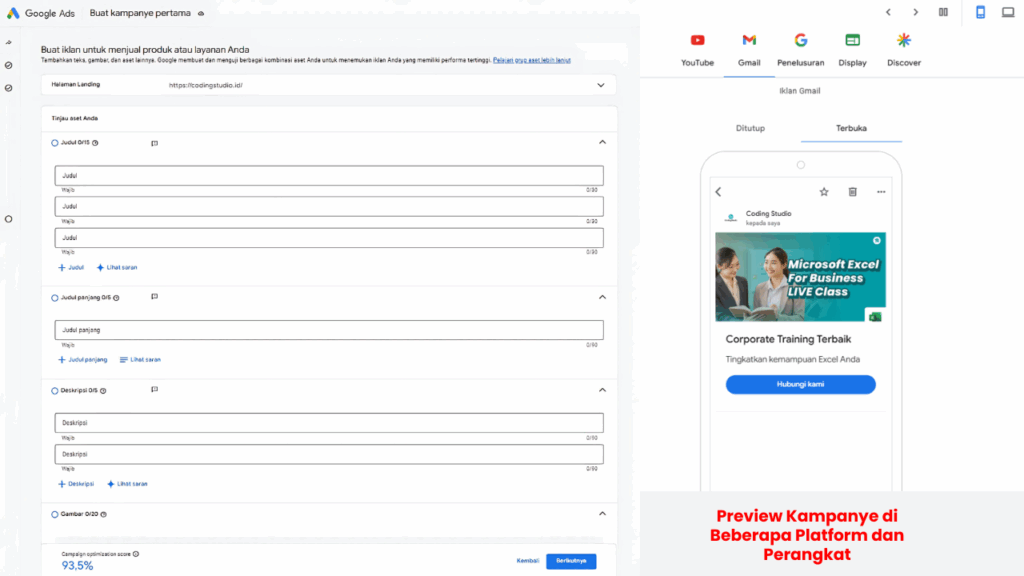
After that, Google Ads will display a form to create your first ad or campaign. This form contains several fields to complete, such as Title, Long Title, Description, Image, Logo, Video, Business Name, Sitelink, and CTA template. You can even see a simple preview of your ad based on the platform and device used.
4. Determine Your Bidding Strategy
After creating your ad, you can set your bidding strategy. Here, determine your focus: conversions or conversion value. Additionally, adjust the Cost Per Action/Acquisition value, which is the cost incurred for each user action after clicking your ad.
Adjust this budget based on your business’s financial capabilities. However, avoid setting the budget too low to increase the chance of your ad being displayed and clicked on by users.
5. Determine Your Business’s Budget
Next, determine how much you want to spend on creating your campaign. Google Ads will provide several options, or you can customize your own.
You can even make payments in various currencies—such as Dirhams, Dollars, Euros, Pesos, Pounds, Ringgit, Rupiah, Won, and Yen.
5. Enter Payment Details
In this section, you’ll fill in several required fields. Here are some of them:
Country
Greenwich Mean Time
Payment Profile
Tax Information
Payment Method
Payment Settings
Additionally, you can receive personalized Google Ads guides, tips, offers, testing opportunities and feedback, and even new feature invitations via email. Check the boxes provided at the bottom of the forum.
6. Review and Launch Campaign
Double-check that all your ad settings are correct—from campaign targets, ad content, to your business’s budget. Also, ensure your payment method is valid to prevent your ads from stopping unexpectedly.
Once you’re confident, launch your campaign and monitor it regularly to see results and key indicators like CTR, CPC, and conversions.
7. Optimize Regularly
Finally, monitor and analyze your ad performance data through the Google Ads dashboard. Identify ineffective ads or keywords, then make changes such as changing ad text, adding new keywords, or increasing your budget in areas that produce the best results.
You can also try A/B testing to find the most engaging ad combinations for your audience.
How to Optimize Your Google Ads Campaign
To maximize your campaign strategy, follow these steps when optimizing your ads in Google Ads.
1. Competitor Analysis
Use tools like SEMrush or SpyFu to monitor competitors’ ad strategies and copy. By conducting a comparative analysis, you can identify market gaps and gain inspiration for refining your campaigns to make them more engaging and unique.
2. Update Ad Copy Regularly
Avoid creating boring ads. Therefore, regularly update your copy, headlines, and visuals. This will keep your ads relevant to them and increase your CTR.
Also, test several ad versions to see which one performs best.
3. Measure ROI Comprehensively
Monitor all your ad data—from click costs to conversions to purchases. This will help determine the effectiveness of each campaign you run. Compare your budget with the results you’ve achieved to determine whether your ads can be optimized or stopped.
4. Increase Quality Score
Improve the relevance between ads, keywords, and landing pages. The higher the Quality Score, the lower the cost of your ad and the more frequently it will appear. Also pay attention to the CTR and the quality of your ad landing page.
5. Remarketing
Set your ads to reappear in the browsers of visitors who have previously visited or interacted with your website. This will increase the chances of conversions for your business.
6. Use the Dynamic Keyword Insertion Feature
With this feature, Google Ads will insert keywords users use into your ad copy. This makes your ads more personalized and relevant. In the long run, this will increase the chances of clicks and conversions.
Why choose Mitra IT?
• Expert Team: We have a team of experienced and creative technology experts.
• Comprehensive Solutions: We not only provide technology but also offer full support to ensure your business success.
• Focused on Results: We are committed to helping you achieve your business goals.
Don’t miss the opportunity to maximize your business potential!
Contact us now for a free consultation.