
Customer Churn Analysis with Excel in Telecommunication Companies
Have you ever experienced a customer churn without a clear reason? This problem is common in telecommunications companies.
Without proper analysis, they struggle to pinpoint the reasons why customers are leaving, ultimately leading to the loss of users and potential recurring revenue.
In this article, Coding Studio presents a simulated, fictional case study from DataCamp—as well as insights from real-life studies like SyriaTel—to give you an idea of how to perform customer churn analysis with Excel.
Background of Churn Problems in Telecommunication Companies
Here is an example of a fictitious problem currently being faced by Company A, a telecommunications company:
1. Increased Churn
In the past 6 months, Company A’s churn rate has increased from 8% to 14%. This increase is quite significant and has resulted in a decrease in revenue of approximately 12%.
2. Suboptimal Utilization of Customer Data
Company A has over 50,000 active customers, but they only use it for simple monthly reporting. They haven’t conducted further analysis to understand customer behavior.
3. Lack of Understanding of Factors Causing Changes in Churn
The internal team only looks at churn figures without insight. For example, they know that customer churn was high in March (15%), but don’t know the cause.
Churn Analysis Approach with Excel
Here is an example of a fictitious dataset about subscriptions per customer owned by Company A:
– Customer ID Tenure (months) Package Usage (GB) Monthly Spend Churn
– C001 2 Basic 5 50,000 Yes
– C002 12 Premium 40 150,000 No
– C003 3 Basic 7 50,000 Yes
– C004 24 Standard 25 100,000 No
– C005 1 Basic 3 50,000 Yes
– C006 18 Premium 35 150,000 No
– C007 4 Standard 10 100,000 Yes
– C008 30 Premium 50 150,000 No
1. Data Cleaning and Validation
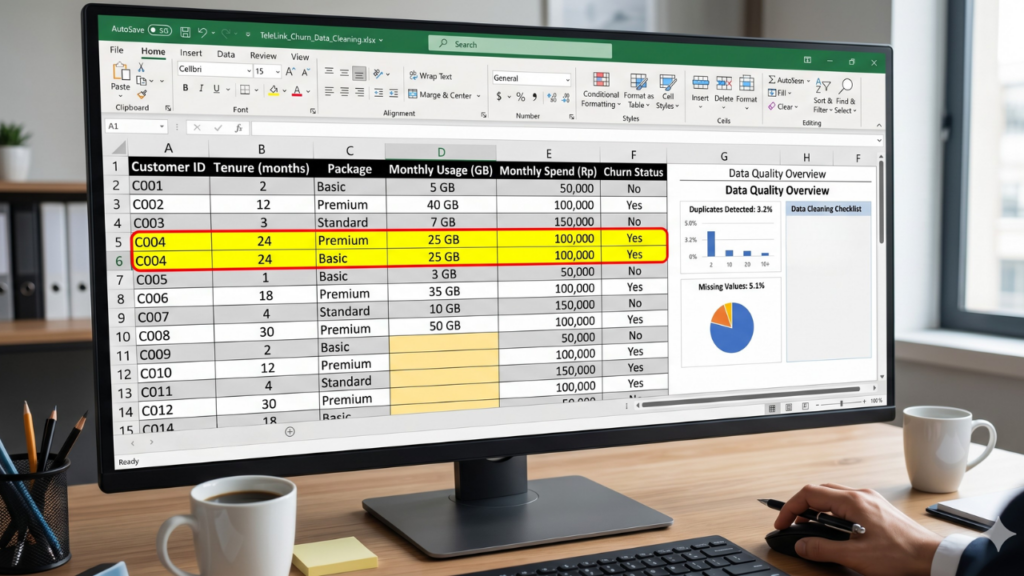
First, Company A’s team found approximately 3% duplicate data and 5% empty data in the usage column.
They then removed duplicates, corrected inconsistent formats, and handled empty data to ensure consistent formatting and accurate analysis results.
2. Exploratory Data Analysis (EDA)
Once the data is ready, the team will explore the dataset using pivot tables and filters to see customer distribution.
Here, they will compare churn rates based on service packages and customer duration. The following are the findings:
• Churn rate for customers <6 months = 18%
• Churn rate for customers >12 months = 5%
In addition, they also found that:
• The Basic package has the highest churn rate: 20%
• The Premium package has the lowest churn rate: 6%
3. Identifying Churn Patterns
Through this simulation analysis, Company A successfully identified consistent customer behavior patterns:
• Customers with usage <10 GB had a churn rate of 22%.
• Customers with usage >30 GB had only a 4% churn rate.
• Customers with low spending (≤50,000) had higher churn rates than premium customers.
From this, they realized that customers with short subscription periods, infrequent use of the service, or those with low-priced plans tended to churn more quickly.
4. Data Visualization
At the end of the simulation, Company A created a simple dashboard in Excel containing the following data for easy interpretation:
• Monthly churn chart (Jan–June: 8% → 14%)
• Churn bar chart by package
• Churned vs. non-churned distribution pie chart
Customer Churn Patterns Discovered
After conducting the analysis, Company A’s team understood that churn is not just a number, but a behavioral pattern that can be learned.
Through this analysis, Company A discovered that customers with tenures of less than six months, low activity, or basic subscriptions are more susceptible to churn.
1. New Customers Are More Prone to Churn
Data shows that Company A’s customers with tenures of less than 6 months have a churn rate of 18%, significantly higher than existing customers (5%).
This usually occurs because they had a less than optimal initial experience or one that didn’t meet their expectations.
2. Low Activity Increases Churn Risk
Customers with low usage (<10 GB) have a churn rate of up to 22%. This indicates they aren’t getting enough value from the service.
3. Certain Service Packages Have High Churn
The Basic package has the highest churn rate (20%), while Premium only has 6%. This could be due to a mismatch between price, features, and customer needs.
1. New Customers Are More Prone to Churn
Data shows that Company A’s customers with tenures of less than 6 months have a churn rate of 18%, significantly higher than existing customers (5%).
This usually occurs because they had a less than optimal initial experience or one that didn’t meet their expectations.
2. Low Activity Increases Churn Risk
Customers with low usage (<10 GB) have a churn rate of up to 22%. This indicates they aren’t getting enough value from the service.
3. Certain Service Packages Have High Churn
The Basic package has the highest churn rate (20%), while Premium only has 6%. This could be due to a mismatch between price, features, and customer needs.
3. Adjusting Pricing Strategy
Company A’s team will then reevaluate service packages with high churn and adjust pricing and features to better suit customer needs. This change will make their product appear more competitive compared to competitors.
4. Decreasing Churn Rate and Increasing Retention
After implementing the new strategy, Company A’s internal team will then evaluate the gradual reduction in churn.
As the customer experience improves, retention will increase—followed by improved business stability.
Leverage Customer Churn Analysis Results to Make Impactful Business Decisions
This case study demonstrates that data analysis doesn’t have to be complex to have a real impact.
Through a structured simulation, you can understand how a data analytics team processes data, discovers patterns, and informs business decision-making.
Why choose Mitra IT?
• Expert Team: We have a team of experienced and creative technology experts.
• Comprehensive Solutions: We not only provide technology but also offer full support to ensure your business success.
• Focused on Results: We are committed to helping you achieve your business goals.
Don’t miss the opportunity to maximize your business potential!
Contact us now for a free consultation.